This page is for club & school administrators.
If you are wanting to register to play with a club or school please click here.
For late registrations (those after the competition has begun) please see Rule 2.6 Late Registration of Players
The official Netball South Canterbury Registration form for 2026 is now available online for your club/school.
There are three steps to the registration process:
1. Register players through the player online registration form.
2. Enter teams into TeamBuilder.
3. Assign players to teams in TeamBuilder.
Your 2026 database of players will automatically be visible to you through your Sporty.co.nz site.
You can email members an invitation to re-register for 2026 - see How to invite your database back to re-register. This saves people having to re-enter their details, instead they simply click on the invite link they are emailed and it opens the 2026 form prefilled with their last seasons details.
Send a link of your form to new members - see How to create a link to your form
For a comprehensive user guide of the registration process, please click the Registration User Guide on the right hand side.
For a Quick Start User Guide CLICK HERE.
If you are unsure of your login details of have had a change of administrator and require login details please email Sporty directly at support@sportsground.com.
Note: All teams in the following grades must enter at least one umpire per team:
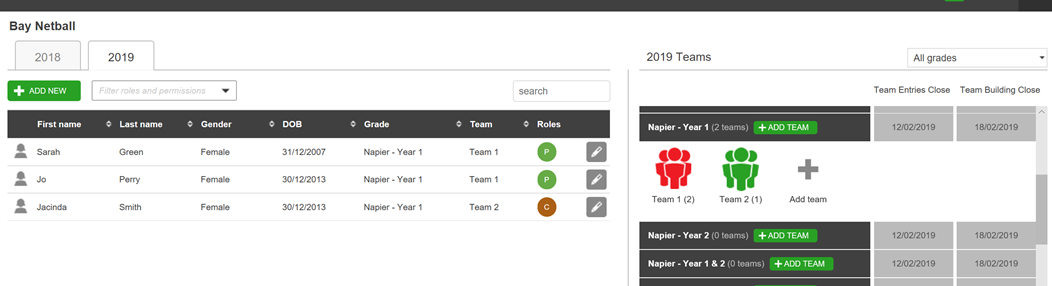
If an umpire is not added to the team, the team will appear in red in TeamBuilder as per the image below.
Superforms make it easy for us to receive consolidated reports from all of our affiliated clubs & schools, while still respecting your privacy requirements.
Superforms is a proven solution that is designed to reduce workload and duplication as much as possible for administrators. Superforms make it easy for us to receive a consolidated report from all affiliated clubs & schools.
Importantly, you can also use this registration form as your own registration form for players/officials to register with you directly if you wish. You have the ability to add additional fields to the form that are specific to you (eg uniform information). Any data in your custom fields is not passed to us, but is securely available for you to use as an online database. This lets everyone's needs be met through the completion of one single web form, so that you don't need to run a separate parallel registration/consent process.
You can decide whether you wish to display this web form publicly to allow people to register with you online, or whether you prefer it to remain hidden so that you can login and enter player details yourself instead. Either way, you will have login access to view and modify details relating to your players, as well as to export your database to Excel, etc.
Once up and running, Superforms lets you:
* Roll forward people from last season to the next
* Send a group email to everyone registered through this solution last season that lets them re-register for the new season with just one click
* Watch your online database grow as people register through your form
* Easily see who hasn't re-registered from last season so you can chase them if you wish
* Customise the input fields on your registration form to suit your needs
* Accept online payments (click here for info on how to set this up)
To set up online payments using Sportspay, click here
Website Builder video
Please visit Sporty Online Help for instructions on how to manage your website and online registrations
Netball South Canterbury
Aorangi Park | P.O. Box 718 | Timaru
Email: office@netballsouthcanterbury.co.nz
Ph: 027 686 0187
Office Hours:
Our working hours and locations at Netball South Canterbury are flexible.
Please get in touch before visiting in person so we can make sure someone is on site to meet you.